Handle a late payroll change without losing the approved version
Handle late payroll input changes through versioned packages, evidence-backed requests and specialist decisions that reflect the current processing stage.
Read guidePayroll preparation and control · part of RDCopilotOS
Between HR and your payroll specialist: inputs validated, changes against last month explained, approvals recorded and one approved package for your provider.
Payslip
| Line | Amount (RON) |
|---|---|
| Gross payFrom contract + monthly inputs | 8,500.00 |
| Social insurance contribution, pension (CAS 25%)Employee contribution | minus 2,125.00 |
| Health insurance contribution (CASS 10%)Employee contribution | minus 850.00 |
| Taxable baseNo personal deduction: gross is above minimum wage + 2,000 lei (6,325 lei in Sep 2026) | 5,525.00 |
| Income tax (10%)Withheld at source on the taxable base | minus 552.50 |
| Net payPaid to the employee | 4,972.50RON |
Bonus 1,200.00 pending approval, not included in v3
Calculated by your payroll specialist. R&D COPILOT checks the inputs, compares the result with last month and records who approved it. Statutory rates in force in September 2026 (Romanian Fiscal Code). Employee and amounts are examples.
Days 1–20
Hours, leave, sick-leave certificates, bonuses, deductions, new hires and leavers arrive from different people on different days. Each one is recorded against the employee, the period and its source, so nothing travels by forwarded email.
| Source | Owner | Received | Status |
|---|---|---|---|
| Timesheets | Team leads | 54 / 58 | 4 missing |
| Leave & sick-leave certificates | HR | 11 / 11 | Complete |
| Bonuses | Finance | 6 / 6 | Complete |
| Deductions & garnishments | HR | 3 / 3 | Complete |
| New hires & leavers | HR | 2 / 2 | Complete |
Day 21cut-off
At cut-off the month is checked against rules you agree with us: missing timesheets, leave that overlaps a contract end, bonuses without an approver, deductions from net pay (garnishments and similar) above half of net pay, values outside the usual range. Each exception has an owner and a reason; the month moves on when the queue is clear or the exception is accepted with a note.
Read the input validation guide2 open · 2 accepted
Day 22HR review
HR reviews the month as a list of changes against last month: who changed what, the old and new value, and from which date it applies. Reviewed changes are frozen into the package that goes to the specialist.
| Employee | Field | Was → Now | Effective | Changed by | Reviewed |
|---|---|---|---|---|---|
| E-014 | Base salary | 2026-09-01 | HR | Reviewed | |
| E-052 | Hire | 2026-09-08 | HR | Reviewed | |
| E-047 | Leaver | 2026-09-15 | HR | Reviewed | |
| E-009 | Meal vouchers | 2026-09 | HR | pending |
REGES-ONLINE For staff employed in Romania: E-052 hire by 2026-09-07 · E-014 salary change within 20 working days · E-047 leaver by 2026-09-15
Day 23calculation
The calculation stays with your payroll specialist or provider. When the results come back, each employee’s net and the month’s totals are set beside last month. Differences above a threshold agreed during setup are flagged and need a reason before approval.
Example threshold: ±10% per employee · agreed during setup
Total net · 2026-09244,850.00RONvs 2026-08: 241,120.00 · ▲ +3,730.00 (+1.5%) increase
| Total | 2026-09 | 2026-08 | Change |
|---|---|---|---|
| Total gross | 412,380.00 | 405,910.00 | ▲ +6,470.00+1.6% |
| Total net | 244,850.00 | 241,120.00 | ▲ +3,730.00+1.5% |
Day 24approval
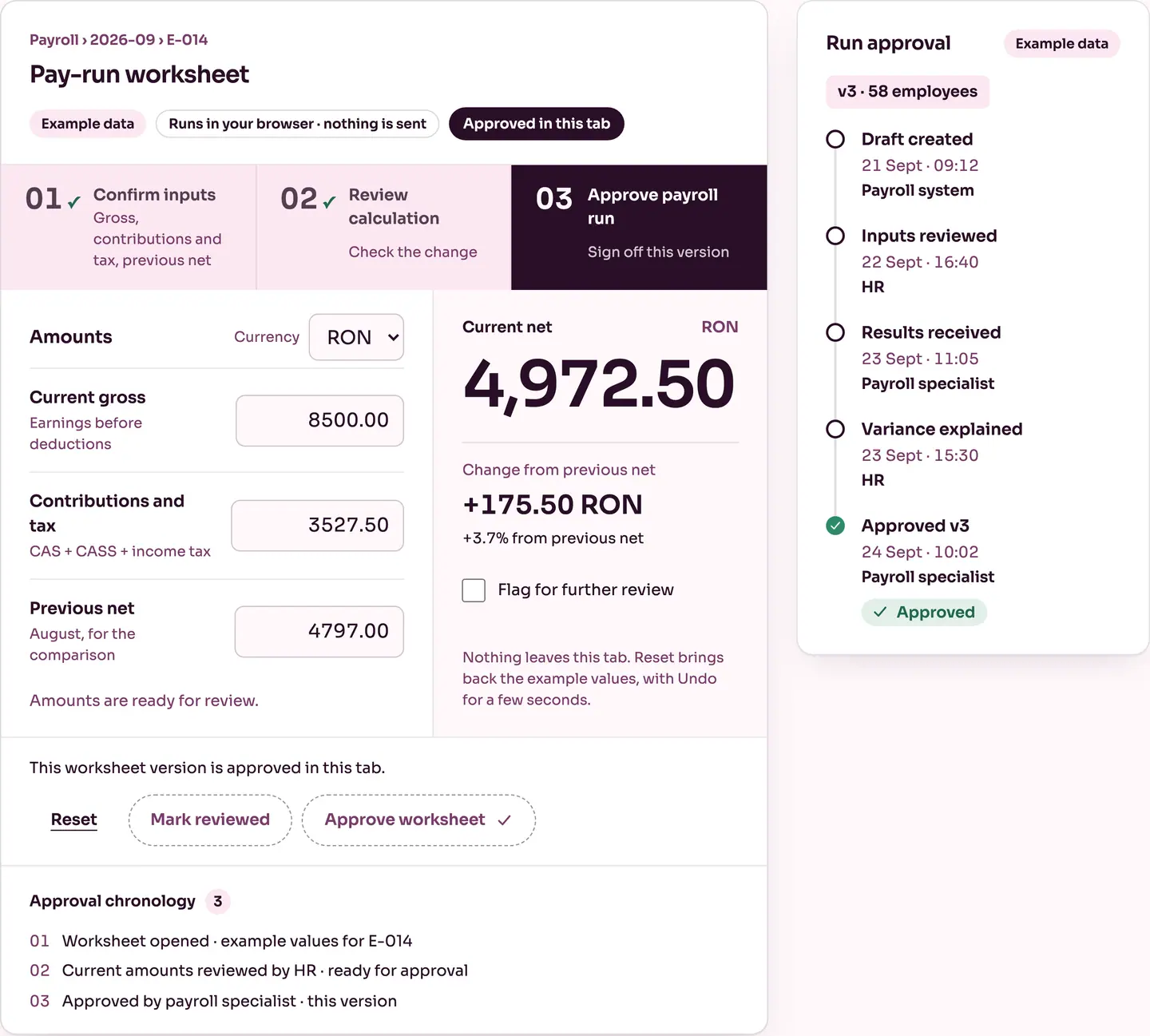
Approval belongs to a specific version of the month. HR marks it reviewed, the approver you name (here, the payroll specialist) approves it, and every step is written to the chronology with the role and the time. Try the worksheet below — it runs only in this browser tab.
Amounts are ready for review.
Nothing leaves this tab. Reset brings back the example values, with Undo for a few seconds.
Inspect the amounts and mark this version reviewed.
v3 · 58 employees
Day 25handoff
How do you run payroll today?
Your specialist receives the reviewed inputs inside R&D COPILOT, the results are entered or imported as agreed during setup, and approval happens there. No file has to leave the company.
The package goes out in the layout your provider already accepts, agreed during setup. Where your provider works in R&D COPILOT, they can confirm receipt there; a later correction stays next to the approved month instead of replacing it.
Read the provider handoff guideYour accountant gets the same package and approval record, so questions are answered from the month’s history instead of email threads.
Package 2026-09 · v3 · approved 24 Sept
Day 27late change
E-031’s timesheet arrives after approval. It becomes a correction request with its evidence, the specialist decides what the current stage allows, and the approved month stays on record beside the correction.
Read the late corrections guideDay 28close
Approved payroll feeds the next steps in other R&D COPILOT products, through connections agreed during setup.
RDCopilotOS
Payroll is one module of the operating system for your company: ERP, operations, CRM, marketing, accounting, HR, inventory, reports, AI and compliance services, on one platform.
Next month
The timeline is set in the first call, depending on your sources and provider.
We scope the work with you first, then quote two things.
Process mapping, checks, handoff layout, connections.
Use of the workflow, EU hosting, updates and support in English or Romanian.
Each team is set up with us after the scoping call.
No. The calculation stays with your payroll specialist or provider. R&D COPILOT prepares and checks the inputs, compares the results with last month, records the approvals and hands the month over.
Yes. It is built for that setup. Your provider receives a complete, approved package in the layout they already accept, and later corrections stay next to the approved month.
In Romania, both stay the employer's legal obligations, and whoever files them for you today keeps doing so. Where it suits you, R&D COPILOT Declarations prepares D112 on the current ANAF form, checked with ANAF's validation software, for your authorised signatory, and R&D COPILOT REGES prepares and tracks REGES-ONLINE changes against their deadlines.
It becomes a correction request with its evidence. The approved version stays on record and the specialist decides what the current stage allows.
The one your provider already uses. We agree the fields and layout with them during setup instead of asking them to change.
Payroll data is stored in EU data centres. Salary amounts are personal data; they are visible only to the roles you authorise, and every change is kept in the history with who and when.
It depends on how many input sources you have and how your provider works. You get a dated plan after the first call, and the first month is a parallel run beside your current process.
There is no self-serve trial. The worksheet on this page runs the review and approval steps in your browser, and in the scoping call we map your own month with you. Access is then set up for your team; if you already have an account, use Sign in.
From idea to implementation
Handle late payroll input changes through versioned packages, evidence-backed requests and specialist decisions that reflect the current processing stage.
Read guideValidate payroll inputs by employee, period and source, with missing-data checks, correction history and a controlled handoff to the responsible payroll specialist.
Read guideConnect HR and an outsourced payroll provider through an agreed data format, approved packages, clear acknowledgments and corrections tied to the original version.
Read guideYour cut-off, who sends what, who calculates and who signs. We’ll come back with a scope and a setup plan.
© 2026 R&D COPILOT Made in EU Contact form